IT Security Documentation
Start here to review IT security documentation for SecureMailMerge, including compliance, data protection, risk assessment, and vendor evaluation.
Summary
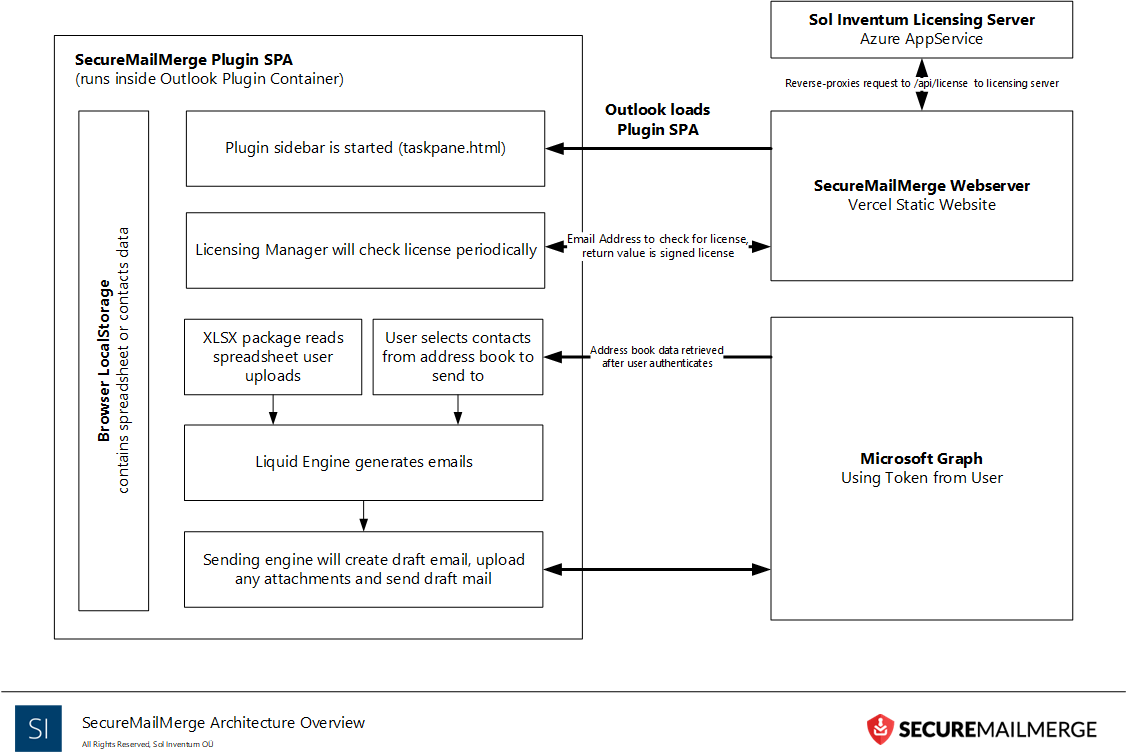
It’s important to note that your spreadsheet and message content are processed on your computer inside Outlook, and the finished emails are sent through your own Microsoft 365 mailbox via Microsoft Graph, like any email you write yourself. The permissions you grant to SecureMailMerge are only used on your computer and never transferred to any server for processing.
The only server that receives campaign-related data is our licensing server, which checks whether you have purchased a commercial license. For this check, we send your own email address (as the user of SecureMailMerge), the product name and a timestamp to that server. We store the licensed user’s email address until the account is deleted; free users’ email addresses are not stored after the license check. Email addresses or other data from your campaigns are never sent to our servers.
Beyond licensing, the add-in reports anonymous usage counts to our self-hosted analytics host and error reports to Sentry. Neither contains recipient data, and both can be blocked at the firewall without affecting the add-in (see the firewall requirements below).
Introduction
SecureMailMerge was designed to allow for a minimal trust operation. This means the plugin was implemented in such a way that all primary functionality is provided on the user’s computer without the need for processing on a server. This allows the security tokens necessary for interacting with the user’s Microsoft 365 account to only ever be transmitted between the user’s computer and Microsoft’s servers but never sent to any other servers.
The only server-side component the add-in depends on is our licensing server, which provides license-checking and purchasing capabilities. Access is granted through a Microsoft 365 account with the minimum permissions necessary to verify your identity. No confidential payment data is stored on our servers; it is stored only on the payment provider’s server that you choose at checkout. Only your email and transaction identifiers are stored on our servers.
The add-in contacts four hosts: Microsoft 365 (Microsoft Graph), our licensing endpoint at www.securemailmerge.com, our self-hosted analytics host analytics.solinventum.com (Rybbit, usage counts only, no recipient data) and Sentry (error reports). Only the licensing endpoint is required; analytics and Sentry can be blocked at the firewall and the add-in keeps working. We have published the necessary minimal firewall requirements to allow SecureMailMerge to communicate with our licensing server.
We have also provided a Publisher Attestation for SecureMailMerge with Microsoft. A Publisher Attestation is a self-reported questionnaire published by Microsoft, not a Microsoft security review.
Microsoft 365 Security Tokens
To send emails, the add-in requires a security token to access Microsoft 365 on your behalf. This token gives the add-in permission to read and write emails in your Microsoft mailbox.
When granting this permission, Microsoft will warn you that the app can send your data to the internet. Because add-ins are software programs running inside Outlook, this is theoretically true. Once access is given through the token, there is no way for Microsoft to limit what the add-in does with that data. For example, we need to communicate with Microsoft Graph (the programming interface used to provide the add-in’s functionality), which is “the internet”. This permission is not unusual for our add-in; it applies to all add-ins that interact with Microsoft 365.
SecureMailMerge was designed to run only inside Outlook. The spreadsheet is processed on your computer, and the emails are generated on your computer. Neither is ever transmitted anywhere other than Microsoft’s own server (i.e. Graph). Our licensing server checks whether you have purchased a subscription; it does not perform any mail-merge-related activities and never receives campaign data. You can read more in our privacy policy.
Operating Environment / Hosting
The SecureMailMerge infrastructure is split into two areas. The website and plugin are statically deployed and do not store any campaign data. The licensing server stores user licensing information.
SecureMailMerge is a Microsoft 365 Add-In for Outlook using the Modern Web Add-In Architecture. This means plugins run in a sandboxed browser environment within the Outlook host (Windows, Web or Mac).
Access to Microsoft 365 data is provided through the Microsoft Graph API which each user has to consent to. The token to access this data is stored securely on your computer and only ever transmitted to Microsoft Graph servers, but never to any other (and specifically never to any of our) servers.
For all services used to host the SecureMailMerge infrastructure mentioned here in this section 2FA (Two Factor Authentication) is enabled on all production accounts.
Website and Plugin
The website and plugin are hosted securely and globally by Cloudflare Pages. Cloudflare is certified against ISO 27001:2022 (certified since 2019), ISO 27018:2019 (since 2022) and ISO 27701:2019 as both PII Processor and PII Controller (since 2021), and has completed an AICPA SOC 2 Type II attestation covering Security, Confidentiality and Availability controls.
Our assets are deployed as static sites, and no campaign data, spreadsheet, recipient data or email content is ever stored on that infrastructure. The one exception is our own advertising measurement: if you arrive through an advertisement, the pseudonymous advertising click identifier described in our privacy policy is recorded in a Cloudflare D1 database for 90 days so we can tell which advertisements work (visitors in the United States only). It holds no name, contact details or campaign content.
Vulnerability scanning and patch management of the hosting environment is provided by Cloudflare.
Cloudflare’s compliance documentation can be found in their Trust Hub, with the specifics of their ISO certifications and SOC 2 status.
Licensing Server
The licensing server is hosted on European servers in Microsoft Azure data centers (the same ones Microsoft 365 uses). Microsoft 365 Authentication is used to grant access to this server to our staff.
Vulnerability scanning and patch management of the hosting environment is provided by Microsoft. Your licensing data is stored on database services managed by Microsoft. We have a point-in-time and long-term backup strategy to recover any licensing data if required. All our databases are encrypted at rest. Direct access to production and the database (including any security tokens) is restricted to the managing director.
Microsoft’s data center security documentation can be found here.
Source Code
Our source code is held in a private repository on GitHub. Access to the repository and rights to deploy code are granted only to the lead developer.
GitHub’s security documentation can be found here.
Payments
Payments are provided through two Merchant of Record resellers, depending on your choice at checkout: Paddle and Microsoft 365 (AppSource).
Paddle’s security documentation can be found here.
Microsoft 365’s security documentation can be found here.
Staff, Development and Customer Support
Only our lead developer has access to our source code and hosting environment and has multiple years of experience in the IT security industry and in Secure Software Development.
All developers employ OWASP secure software lifecycle best practices (including security-by-design, deny-by-default and basic threat modelling). No production data is ever used in a non-production environment. Our lead developer approves all code changes that go into production.
No member of staff has access to your campaign data or your Microsoft 365 account security tokens. This information is never transmitted to our servers.
Staff members providing customer support have access only to the information you provide. This information is held confidentially and securely in our help desk system (Help Scout) and is never shared with other third parties.
Documents
We provide several more detailed documents on specific topics:
- Secure mail merge: where your data goes
- Privacy Policy
- Data Processing Addendum
- Required Microsoft 365 permissions
- Required Firewall settings
Ready to improve your mail merge?
SecureMailMerge for Outlook
Runs inside Outlook, with no external app needed.
Free version, no credit card required.
Purchase license to remove promotional footer.