How do I set a reply-to address for my mail merge?
Learn how to set a custom reply-to email address so that recipient replies go to a different address than the one you send from.
SecureMailMerge lets you set a custom reply-to address on all messages in your campaign. When a recipient clicks “Reply” in their email client, their response will be addressed to the reply-to address instead of your sending address.
This is useful when you want to:
- Send from your personal address but have replies go to a shared mailbox or team inbox
- Direct replies to a colleague or assistant
- Route responses to a dedicated address for tracking or processing
Setting the reply-to address
1. Open advanced options
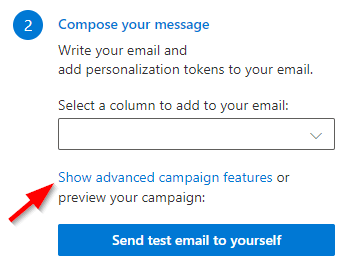
In the campaign manager, select the link that shows or changes advanced options. The advanced options reference describes the whole screen, including what carries over to your next campaign.
The reply-to address is in the “Message options” group.
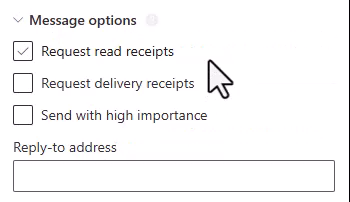
2. Enter the reply-to email address
In the advanced options, open the “Message options” group, find the field labelled “Reply-to address” and enter the email address where you want replies to go.
SecureMailMerge will validate that the address is a properly formatted email address before sending.
3. Send your campaign
The reply-to address will be applied to every message in your campaign, including the test email. You can verify it works correctly by sending a test email first and checking the reply-to address in your email client.
Things to know
- One address per campaign. The reply-to address is the same for all recipients in the campaign. It cannot be personalised per recipient using merge tokens.
- Single address only. You can set one reply-to address, not multiple.
- Saved with your campaign. The reply-to setting is saved as part of your campaign, so if you resume a campaign later, the setting will still be there.
- Remembered between campaigns. Advanced options, including reply-to, are reapplied to your next campaign and survive replacing the spreadsheet. The campaign start date is the only exception. The campaign view lists how many options are currently active, so check it before you send.
- Works with all email clients. The reply-to header is a standard email feature supported by all major email clients.
Ready to improve your mail merge?
SecureMailMerge for Outlook
Runs inside Outlook, with no external app needed.
Free version, no credit card required.
Purchase license to remove promotional footer.