What are the maximum limits for mail merge campaigns?
Discover the recipient limits and sending constraints for SecureMailMerge campaigns in Outlook, including maximum emails and campaign size.
SecureMailMerge does not impose any artificial limits on the number of recipients you can include in a mail merge campaign. However, there are some practical considerations:
Microsoft 365 Sending Limits
Your sending limits are determined by your Microsoft 365 subscription and tenant configuration. Microsoft 365 work and school mailboxes can send to 10,000 recipients per rolling 24 hours. The limit counts recipients, not messages. Each message can have up to 500 recipients by default, and administrators can raise that to 1,000. Sending is throttled at 30 messages per minute. Your tenant also has an external-recipient limit that depends on its license count, and administrators can set lower limits. These are Microsoft’s defaults, not guaranteed capacity. SecureMailMerge adds no limits of its own.
These limits are enforced by Microsoft, not SecureMailMerge. Your IT administrator can tell you which limits apply to your tenant - contact them if you are unsure. For a full breakdown of the limits, the error messages you see when you exceed them, and pacing strategies, see Outlook email sending limits.
Setting your own daily limit
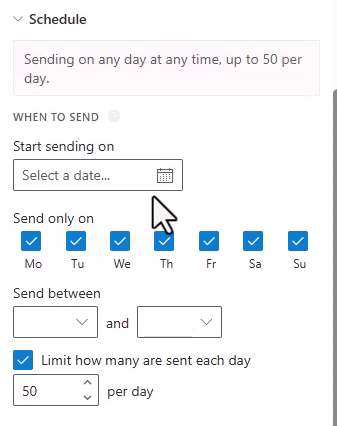
SecureMailMerge can also enforce a limit you choose yourself. In the advanced options, under “Schedule” and then “When to send”, tick “Limit how many are sent each day” and set the number of messages per day (ticking it fills in 50). No more than that many messages are scheduled per calendar day, and the rest move to the next selected sending day.
This is the simplest way to stay well below Microsoft’s caps on a large campaign. You can combine it with a daily time window and a weekday selection on the same screen.
Attachment Size Limits
The default message size limit in Microsoft 365 is 35 MB (including attachments). Administrators can increase this up to 150 MB. Keep in mind that attachments grow by about a third when sent via email, so a 24 MB file actually uses around 32 MB of your limit.
For large files, consider sharing via OneDrive or SharePoint links instead of direct attachments.
Ready to improve your mail merge?
SecureMailMerge for Outlook
Runs inside Outlook, with no external app needed.
Free version, no credit card required.
Purchase license to remove promotional footer.